From UI Inconsistency to a Scalable HRMS Design System
3x Faster. Zero Chaos
Design Token
40+
Component library
20+
Pattern libarary
04
PAGE LAYOUT
06

Design Challenge
3–4 variations of same component accross modules .
Lack of a unified design foundation led to inconsistent UI styles.
Multiple layout structures
Design–Dev Challenge
30–40% dev time spent rebuilding component
Gap in design & coded O/P
Frequent design clarification due to missing specs

Visual Proof - What Inconsistency actually looks like
Button
Radius - 2px
Text weight - bold
Padding - 17.5
Button
Radius - 6px
Text weight - Regular
Padding - 25
Same Component - 2 Different implementation
Research & Audit
Analyzed the product and leading design systems to identify gaps and build a scalable foundation.
Stakeholder Interviews
Interviewed designers and developers to understand pain points, needs, and constraints.
System Building
Leveraged established design systems to craft a custom system tailored to our product.
Audit & Discovery
Duplicate components found
Inconsistent layouts and the missing states.
Derived design system roadmap
Setting Foundation
Defined color & spacing tokens
Established typography & effect styles
Built scalable visual foundations
Component Library
Built 40+ reusable components
Build variants, states for required componen
Created scalable floorplan structurests
Rollout & Adoption
Conduct on-boarding session for designers
Synced design system with development
Created scalable floorplan structures
Audit & Discovery
Evaluated the product to uncover inconsistencies and improvement opportunities.
Full product audit
Conducted a comprehensive audit across the product to identify design inconsistencies and gaps.
Inconsistencies & gaps
Mapped inconsistencies across modules, components, and interactions.
Design System Roadmap
Defined a phased roadmap to build, scale, and continuously improve the design system across the product.
🔍
Full product audit


15+ modules reviewed
🔍
Full product audit
15+ modules reviewed
🔍
Full product audit
15+ modules reviewed
A flexible architecture built to adapt — breaking down all elements into their most atomic form. Typography, color, spacing, and inputs are decoupled from context and composed intentionally.
🎨
Color
🔤
Typography
📐
Spacing
🔷
Icons
🌑
Effects
“The app was constantly evolving, so the color system needed to be flexible, purposeful, and easy to scale. I audited existing modules to identify where color played a critical role — then built a structured token system around real usage patterns. ”
Leave Form
Employee ID
Provided ID Number is Invalid
Notice how same red "EF4444" act as a border , an icon, background and text
color - border - danger
color - icon - danger
color - helpertext - danger
Mapped To Semantic
#EF444
Premitive - red/500
Semantic - Color-border-danger
Changing "red-500" updates all danger varaiable instantly. However, we can also selectively reroute any token without affecting the other two


"Building a consistent, scalable type hierarchy with meaningful token names, rigorous architectural schemas, and clean cross-platform alignment."


"Elevation is more than aesthetics—it represents the mental model of space and focus. Well-governed effect tokens lead to intuitive software."


"Elevation is more than aesthetics—it represents the mental model of space and focus. Well-governed effect tokens lead to intuitive software."
LEVEL 01
Atoms
Basic building blocks of matter. Singular purpose components that cannot be broken down further.
Button
Input
Checkbox
Tag
Badge
Tooltip
LEVEL 02
Molecules
Combinations of atoms bonded together. Relatively simple groups of UI elements working as a unit.
Dropdown
Tabs
Toggles
Breadcrumb
Menu
+10 Components
LEVEL 03
Organisms
Complex UI assemblies composed of molecules and/or atoms. Forms distinct, functional sections of an interface.
Table
Navigation
Side Panel
Modal
Stepper
Notification

Atoms - Button Component

🚨 Handled severity
✨ Button states
📏 Multiple size
🧩 Reusable variant
Molecules - Input Component
⚠️ Error state & validation
💬 Helper text support
🧩 Prefix & suffix icons
✨ Interaction states
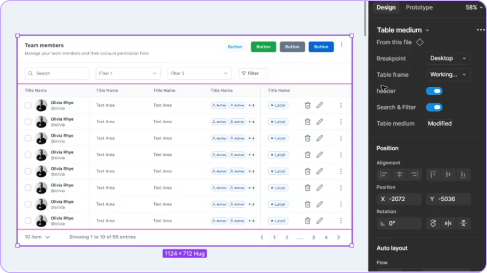
Organisms - Table Component
🧩
Slot-based structure for cells
📊
30+ reusable cell variants
🔤
Flexible header with actions & icons
🔎
Search & filter patterns
Reusable building blocks for consistent design. The bridge between raw UI tokens and complete layout templates.


Notification
Type
Error
Warning
Info
Success
When
Action Failed
Risk Ahead
update
Action Completed
Action
Often
Sometimes
Rarely
No
“Created resuable page layouts that bring components and patterns together into consistent, scalable screen structures. ”
➕
Buttons
🏷️
Tag / badge
⌨️
Input Field
📑
Tabs
Components
Individual UI elements
+
Table + filters
Search pattern
📭️
Empty state
Modal
Patterns
Components working together
+
↔️
Spacing
📐
Alignment
🧭️
Hierarchy
📄
Content regions
Layout Structure
Structured experience layouts
=

Dashboard
Overview pages — metrics, charts, quick actions at a glance.
Structure
Header
Sidebar
Widgets (cards, charts)
Quick actions
“Created resuable page layouts that bring components and patterns together into consistent, scalable screen structures. ”
01
Adoption
Figma
Token variables
Design tokens
Named system
Angular
CSS variables
Product
Shipped
Token Name Parity — Figma ↔ Angular
brand.500
$brand-500
error.strong
$error-strong
$spacing-md
SF Pro / 10px
$text md
02
Impact
Component Rebuilds
0
Zero rebuilds
Design Speed
3X
Faster per module
Consistency
Improved consistency
100%
03
Before & after
Before
Every module had a different layout ,same components, different structure
Designers rebuilt components from scratch for each module
State changes required manual redrawing of screens
Token names mismatched between Figma and Angular code
Handoffs were unclear — lots of back and forth with devs
After
Every layout follows the defined floor plan, structural consistency guaranteed
Designers pick from library , zero rebuilding components
State changes handled instantly via component properties
Token names in Figma match variable names in Angular exactly
Handoffs are clean, structured, and self-explanatory