
20+
Component library
04
Pattern library
06
Floor Plans
40+
Design Tokens
Challenge
As our HRMS product scaled, the experience didn’t
Design Challenge
•
3–4 variations of the same component
•
0 design documentation
•
Multiple layout structures
Design–Dev Challenge
•
30–40% development time spent rebuilding component
•
Gap in design & coded O/P
•
Frequent design clarifications due to missing specs
Button
Radius - 2px
Text weight - bold
Padding - 17.5
Button
Radius - 6px
Text weight - Regular
Padding - 25
Same Component - 2 Different implementation
Goal

Creation of a unified design system
Role

Research & Audit
Audited the product and analyzed industry design systems to identify inconsistencies and define scalable solutions.

Stakeholder Interviews
Conducted one‑on‑one interviews with designers and developers to capture their pain points and constraints.

System Building
With insights and inspiration from established design systems, I crafted a custom system tailored to our product.
Process
01
Audit & Discovery
🔍
Full product audit


15+ modules reviewed
⚠️
Inconsistencies & gaps
Multiple button sizes & variants used inconsistently
Different input field structures across forms
Table layouts and cell patterns lacked standardization
Missing hover, active, disabled, and loading states
Tags, badges, and status colors were inconsistent
No reusable empty, loading, or error states
🗂️
Design System Roadmap
🧩
Foundation - Tokens , text styles , Effects
📊
Systemization - Components, patterns, floor plan
🔤
Governance - Documentation & component guidance
🎯
Component Prioritization
01
Button
High Priority
02
Input field
High Priority
03
Feature Icons
High Priority
04
Data table
Medium
05
Modal
Medium
06
Badge & tags
Low
02
Foundation
Built to flex, made to last
A flexible architecture built to adapt — breaking down all elements into their most atomic form. Typography, color, spacing, and inputs are decoupled from context and composed intentionally.
🎨
Color
🔤
Typography
📐
Spacing
🌑
Effects
🔷
Icons
🎨
Color
“The app was constantly evolving, so the color system needed to be flexible, purposeful, and easy to scale. I audited existing modules to identify where color played a critical role — then built a structured token system around real usage patterns. ”
✏️
Naming with actual Usage in product
0365D6
❌
Blue
❌
Button/active/background
✅

🔤
Typography

The Problem
Inconsistent font sizes and weights were disrupting visual hierarchy and feel unstructured.
✅
The Fix
Streamlined by defining a clear, scalable type system with consistent roles and hierarchy
Style
page/header
section/header
table/ header
table/body/row
input/text
tag/typography
Size
24.5
21.5
17.5
14
14
10.5
Weight
Semibold
Semibold
Semibold
Regular
Regular
Semibold
Text
Typography
Typography
Typography
Typography
Typography
Typography
SF Pro
Primary
SF Pro Text · SF Pro Display
3 WEIGHTS & Line Height
Aa
Regular
Body text, descriptions, table rows, placeholders
Aa
Semibold
Labels, headers, nav
items, form labels
Aa
Bold
Page titles, modal headings
100
Tight · headings, labels
Auto
Default · most UI elements
150
Loose · body, descriptions
🌑
Effects
Before Effects in design system
Every Designers used a different box-shadow value
Modals felt flat on some screens
Designers manually typed shadow values
After Effects in design system
Define it once. Use it everywhere. Change it once. Updates everywhere
Consistent elevation across all modules
One click — effect style applied


India
Australia
Saudi Arabia
USA
UX Designer
Test Engineeer
Front End Develper
Data Analyst


❌ Inconsistent shadow usage across the same dropdown overlay component
Clear
Albania
Algeria
American Samoa


Named effect styles semantically by component purpose to maintain consistency and scalability across the system
✅ Standardized dropdown overlay shadow with defined principles & shared tokens
🎨
Card Shadow
Card, widget, dashboard summary
📐
Overlay Shadow
Subtle lift for cards and panels
🎯
Focus Ring
Iinputs, dropdown, radio button
⬛
Overlay
Modal, Dialog, popups
📝
Input Focus
Input field, text area and search Bars
03
Component Library
“Atomic Design helped me turn UI chaos into a scalable system “
Build with !
-Design tokens
-Auto layout
-Variants & properties
-Slots & nested components
-Responsive structures
💡
Atomic Structure
25+ Components across 3 layers
Atoms
Molecules
Organisms
Button
Input
Checkbox
Radio
Tag
Badge
Tooltip
Dropdown
Tabs
Toggle
Breadcrumb
Menu
Pagination
File Upload
Accordian
Table
Navigation
Side Panel
Modal Layout
Stepper
Atoms - Button Component

🚨 Handled severity
✨ Button states
📏 Multiple size
🧩 Reusable variant
Molecules - Input Component
⚠️ Error state & validation
💬 Helper text support
🧩 Prefix & suffix icons
✨ Interaction states
Organisms - Navigation Bar

🧩
Slot-based structure for elements
📊
Use of different states
🔤
Flexible with actions
🔎
Search field
03
Pattern Library
Why pattern library ?
Without patterns, every workflow becomes a new problem to solve.
How I build it !
-Analyzed recurring workflows
-Identified Common Structures
-Standardized Reusable Patterns
-Defined Rules & Behaviors
-Connected With Component Library
-Documented for Adoption
Table Component
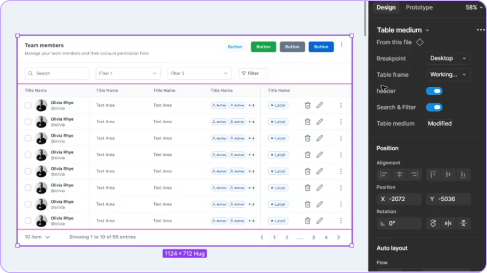
🧩
📊
🔤
🔎
03
Floor Plan
Why Floor Plans Matter !
-Layouts become reusable
-Workflows become familiar
-Teams build faster
-Product consistency improves
How i Build it !
➕
Buttons
🏷️
Tag / badge
⌨️
Input Field
📑
Tabs
Components
Individual UI elements
Table + filters
Search pattern
📭️
Empty state
Modal
Patterns
Components working together
↔️
Spacing
📐
Alignment
🧭️
Hierarchy
📄
Content regions
Layout Structure
Structured experience layouts

Dashboard
Overview pages — metrics, charts, quick actions at a glance.
Structure
Header
Sidebar
Widgets (cards, charts)
Quick actions
03
Adoption & Impact
01
Adoption
Figma
Token variables
Design tokens
Named system
Angular
CSS variables
Product
Shipped
Token Name Parity — Figma ↔ Angular
brand.500
$brand-500
error.strong
$error-strong
spacing.md
$spacing-md
SF Pro / 10px
$text md
02
Impact
Component Rebuilds
0
Zero rebuilds
Design Speed
3x
Faster per module
Consistency
100%
Improved consistency
03
Before & after
Before
Every module had a different layout ,same components, different structure
Designers rebuilt components from scratch for each module
State changes required manual redrawing of screens
Token names mismatched between Figma and Angular code
Handoffs were unclear — lots of back and forth with devs
After
State changes handled instantly via component properties
Token names in Figma match variable names in Angular exactly
Handoffs are clean, structured, and self-explanatory