Traditional UI to Conversation AI
Ask, Don't search!
Conversational AI transforms Employee Self Service from a navigation-heavy, form-driven experience into a guided, information-rich conversation that helps employees understand first and act with confidence
↓ 70%
Less Navigation
↑ 60%
Faster Task Completion
↓ 60%
Fewer HR Queries

CHALLENGE
Business Requirement
The organization aims to enhance the Employee Self-Service (ESS) experience by reducing the effort employees spend searching for information, navigating multiple modules, and understanding HR policies. Employees should be able to access information, complete requests, and receive guidance through a single conversational interface.

PROBLEM STATEMENT
The Problem with Traditional UI
A navigation-heavy, form-driven experience that creates friction and forces employees to hunt for answers.

Multi Page Navigation
Employees often need to move between different modules, policy pages, balance screens, and application forms to complete a single task
Policy Hunting
Critical information is usually buried within lengthy HR policy documents. Employees must search through multiple pages to understand eligibility, limits, documents before taking action.
High Cognitive Load
Users are required to remember information from different screens, interpret policy language, perform calculations, and make decisions while simultaneously completing forms, creating unnecessary mental effort.
HR Dependency
Due to uncertainty around policies, eligibility, and process requirements, employees often rely on HR teams for clarification, resulting in repetitive queries and reduced self-service effectiveness.
Understanding The User
Scenario: Ahmed wants to apply for leave encashment but is unfamiliar with the company's encashment policy.
Unsure which leave types are eligible for encashment.
Doesn't know how many leave days can be encashed.
Cannot easily understand how the payout amount is calculated.
Doesn't know how encashment will affect his remaining leave balance.
Has to search through lengthy policy documents for answers.
Must navigate multiple screens before completing the request.
Relies on HR for clarification before submitting the application.

DISCOVERY
Research & discovery
Identifying the opportunity through stakeholder discussions, workflow analysis, and user pain point mapping.
Methods

Stakeholder discussions
Understand business goals, operational challenges, expectations for AI-powered ESS.

Existing Workflow Analysis
Evaluate how employees currently complete HR tasks within the traditional ESS platform.

Competitor Analysis
Explore how modern HR platforms and AI assistants support employee self-service.

User Pain Point Mapping
Identify friction points employees face during HR transactions.
OPPORTUNITY
Defining the Opportunity
How might we help employees complete HR tasks without navigating multiple modules and reading lengthy policies?
Key Insights
A focused set of design challenges to elevate the experience from screens to conversations.
Employees spend more time finding information
Policies are difficult to understand.
Users don't know eligibility before applying.
Frequent HR dependency.
Achieve by
Reduce navigation effort
Minimize cognitive load
Provide contextual guidance
Reduce HR Depedency
Stratergy
AI UX Principles
Guiding the interaction between intelligence and users through clarity, context, and trust.
Principle 1
Intent
Recognition
Understands requests regardless of wording by mapping semantic meaning to system actions.
Principle 2
Contextual Awareness
Remembers conversation state and environmental variables to provide relevant assistance.
Principle 3
Progressive Disclosure
Reveals information step-by-step only when needed to minimize cognitive overload.
Principle 4
Personalized Responses
Uses employee-specific data and historical preferences to tailor every interaction.
Principle 5
Explainable Calculations
Uses employee-specific data and historical preferences to tailor every interaction.
Principle 6
Guided Conversations
Replaces complex forms with intuitive questions that adapt based on previous answers.
Principle 7
Error
Recovery
Handles invalid requests gracefully by suggesting alternatives or asking clarifying questions.
Design
Conversation Design Framework
A structured flow that turns a request into a guided, information-rich conversation.
Intent Recognition
Context Gathering
Policy Guidance
Recommendation
Confirmation
Submission
FLOW DIAGRAM
User Flow
A clean, modern flow that reduces friction and keeps the employee moving forward.

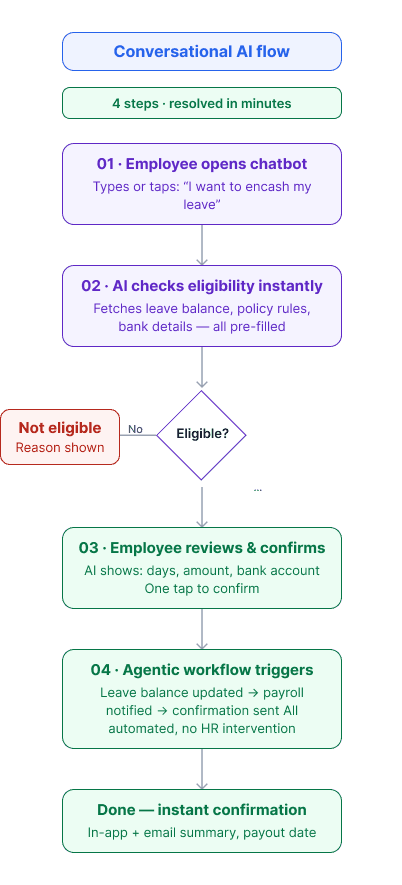
UI Challenge
Challenge in Conversational UI
A focused set of design challenges to elevate the experience from screens to conversations.


UI DESIGN
Conversational AI Design
A Visual representation of traditional UI vs Conversational AI
Traditional UI
9:41
Apply Encashment
Leave Type
*
Annual Leave
Application Submission Date
*
Oct 24, 2023
Encashment Days
*
10
Days
Reason
Personal Reason
Preview Summary
Leave Type
Annual Leave
Available Balance
15 Days
Encashment Leave
10 Days
Remaining Leave
5 Days
Submit
Cancel
01
Unsure which leave types are eligible.
02
Switch to policy page to eligibility & rules
03
Lacked visibility into the encashment limit.
04
Unaware of the encashment payout amount.
05
Lacked clarity on the post-encashment leave balance.
06
Approval progress was only visible in the Requests module.
Conversational AI
Encashment Application

Apply Encashment
Ask Anything
01
Shows eligible leave types instantly
02
Explains policy rules within the chat
03
Display maximum limit before applying
04
Calculates estimated payout amount and display before confirming
05
Shows what happens to remaining leave balance after encashment
06
Provides approval status directly in the conversation once request is submited
RESULT
Impact Highlight
A conversational AI assistant can measurably improve the employee experience and reduce operational load.