One Report Framework, Infinite Use Cases
Resuable Report Framework
A single, composable report interface that adapts seamlessly across 8+ HR reports—including Payroll, Leave, Loan, and Employee—eliminating redundant screens while delivering a consistent, clear, and learnable experience for HR teams.
ROLE
Product Designer
TOOLS
Figma, FigJam
TIMELINE
4 weeks
TEAM
Designer, PM

Problem
A Fragmented Reporting Experience
Enterprise HR platforms often build separate reporting screens for each module—Payroll has one, Leave another, and Loan yet another. This leads to inconsistent patterns, increased engineering and QA overhead, and a steep learning curve, as users must relearn navigation and layouts for every report type.
Solution
One Framework, Many Reports
We designed a universal report framework built around a configurable toolbar and flexible data grid. By standardizing the workflow into four clear phases, users learn the model once and can apply it across different reports. Each report type simply configures its own scope, dimensions, metrics, and filters within the same framework.
1
Configure
Set Scope, period , dimensions and metrics.
2
Refine
Search & Filter to narrow result.
3
Analyze
Compare, segment and aggregate data.
4
Act
View, export and print result data.
One Design. Many Solution
The report framework powers every module across the platform. Only the underlying data context changes dynamically, while the shared interaction model, universal filters, and flexible data grid remain consistent—creating a familiar experience across every report and minimizing the need to relearn workflows.
Compensation Report
Leave Report
Attendance Report
Loan Report
Payroll Report
Termination Report
GOSI Report
New Joinee Report
Employee Report
Process
How I Build it!
I analyzed existing reports, identified common patterns, converted them into reusable components, and built a configurable framework that could adapt across multiple HR modules.

How it works
The framework follows a simple Pick → Customize → Use approach. Designers start with a reusable report structure, customize it based on each module’s data and requirements, and reuse the same framework across multiple reporting use cases.
One reusable framework
Start with the common report structure and reusable components.
Customize by module
Configure the relevant scope, filter etc and data based on the module
Use across use cases
Adapt the same framework to multiple reporting needs.
Design Process
Configure
The foundational step in every report journey. Users define the dataset they need by selecting the organizational scope, time period, primary dimensions, and metric columns.
Scope
Defines the organizational boundary of the report. Users select the entity the report applies to—such as a branch, department, or employee—through a hierarchical dropdown that adapts to their access level. Managers can view their teams, while admins can access the broader organization.

Period
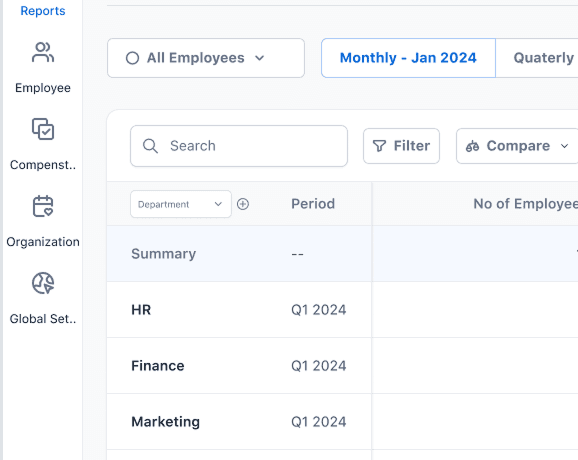
Controls the time window of the report. A tab-based pattern—Monthly, Quarterly, Half-Yearly, and Yearly—lets users switch time granularity instantly without leaving the report. The selected period remains visually persistent, providing clear context and reducing reliance on date-picker interactions.

Dimension & Sub Dimension
Defines how report rows are grouped. The primary dimension establishes the main row identity, while the sub-dimension adds a secondary grouping level. This two-level structure provides deeper analysis without requiring users to understand complex pivot-table interactions.

Metrics
Controls which data columns appear in the report grid. Users can toggle individual metrics, with a live count showing their selections. This keeps data tables focused and manageable, while default presets provide a useful starting view for new users.

Refine
Once configured, users can narrow the results using instant text search and structured filters. Together, they reduce cognitive load by helping users focus only on the relevant data.

Filter
Structured filters let users apply precise criteria such as department, status etc. Active filters appear as visible chips, making applied constraints clear at a glance.
Search
A persistent toolbar search lets users quickly find records by name or ID, keeping a frequent action always accessible.
Analyze
Analysis tools let users go beyond a flat list. Compare enables side-by-side evaluation, Segment groups data by category, and Aggregate condenses detailed rows into meaningful summaries.

Compare
Compare mode adds a second data context alongside the primary view. Comparison columns appear within the same grid, allowing users to spot differences at a glance without switching between views.

Segment & Aggregate
Segment displays data as individual groups or records, while Aggregate combines data across selected periods—such as January and February 2026—into a single consolidated view for a broader summary.
Act
The foundational step in every report journey. Users define the dataset they need by selecting the organizational scope, time period, primary dimensions, and metric columns.

Export & Print
Export and Print actions are placed in the top-right corner, following familiar enterprise UI conventions. Both actions respect the active filters, segments, and selected metrics, ensuring users export or print exactly what they see.
The Experience in Action
Explore the end-to-end report experience through a prototype showcasing the framework, customization options, filters, analysis tools, and key interactions across different use cases.
One Framework, Multiple Report Experiences
The reusable report framework adapts seamlessly across different HR use cases—from Loan and Payroll to Salary Revision, New Joinee, and Summary Reports—while maintaining a consistent structure, interaction model, and visual language.


Metrics
Metrics
Impact through framework reuse, design efficiency, consistency, report creation speed, and user adoption—showing how the reusable system reduces duplication and scales across modules.
🔄
Framework Reuse
1 framework reused across 8+ HR modules
⚡
Design Efficiency
Reduced duplicate report screen designs
🎯
Consistency
Standardized reporting patterns across modules
📈
Scalability
New reports created through configuration rather than redesign
👤
Usability
Reduced learning curve with a familiar reporting experience